

 Last week I was chatting to Darren Franks when he mentioned Hubspot. I’ve often wondered how Hobspot could be used for recruitment and Darren tells me he’s been asked this question multiple times by clients who are keen to know why so many corporates are using Hubspot. So here, Darren asks Is Hubspot right for your Recruitment Agency? (Please note, this is not a comprehensive review of Hubspot).
What Hubspot is
In Hubspot’s own words “HubSpot is an inbound marketing software platform that helps companies attract visitors, convert leads, and close customers”
Inbound Marketing is changing the way companies sell their products and services. Those companies who are embracing it are seeing huge ROIs. Just think about the last time you purchased something – chances are you Googled it first. Your clients and candidates do the same. Hubspot recognises this and they have built a platform that helps you capture, nurture and close those leads.
What Hubspot isn’t
Hubspot is not an ATS (Applicant Tracking System) or a RMS (Recruitment Management System) – let’s be very clear on that. It’s not built to track candidates through a process, be integrated with job applications or be used to extract reports. ATS and RMS platforms are all about workflows and tracking candidates and clients through a recruitment process.
Hubspot offer 3 main products:
- CRM
- Hubspot Sales
- Marketing
Let’s start with the CRM
A CRM is for attracting, converting and managing customers (or potentially candidates depending on the dynamics of your business/market). Hubspot’s CRM is TOTALY FREE – you can use it today and not have to pay a penny. I first used Hubspot to sort out my thousands of LinkedIn connections (I’ll show you how to do that later). They also offer Gmail and Outlook plugins that allows you to track a certain amount of emails per month. That’s great for knowing when someone has opened your email and clicked on a link (or opened an attachment just as a job spec or CV).
However, you cannot do mass mailings to your contacts through Hubspot’s free CRM, you’ll need to use an EMS (email management system) such as Mailchimp to do that. What’s more, you cannot segregate contacts into Clients or Candidates – there can only be one record and that could be problematic when you have a client who’s also a candidate.
There are other features to the CRM such as deal tracking and the whole CRM is fairly customizable. You can easily integrate Hubspot to your Google Account and they have a host of other integrations powered by Zapier.
Hubspot Sales
Hubspot Sales is a great tool – it allows you to create templates, sequences (I’ll explain that shortly), hunt for prospective clients and track all your emails.
We’ve been using Hubspot Sales for 3 months and absolutely love it. So how might a staffing agency use it?
Imagine you’ve just connected to a prospective client or candidate on LinkedIn – they’ve accepted your invite and you want to reach out to them. All you do is simply create their record in Hubspot (which takes seconds) and click on the template that you’ve designed all within outlook or on the Hubspot system. The email is sent and you get an alert the instant your contact opens the email (and every time they subsequently do). There’s also a mobile app which support this.
Sequences can be fantastic – you can set up a series of templates and then subscribe your contacts to the sequence. As an example, you could have a sequence for prospective clients – first email is an introduction, next could be a phone call (which you can also do straight from within Hubspot), then a second email with some more information, then another call, then a third follow up – you can configure the emails to go out whenever you like and Hubspot has some amazing content on their website to guide you through best practices. This allows you to nurture your relationships with your customers (but don’t rely just on emails!) – it also automates some of the process, therefore forgetting to call or email someone becomes a thing of the past. As soon as someone replies to one of your emails they are removed from the sequence.
The prospects tool is very interesting. You can see who (as in which company) has visited your site and if they aren’t yet a prospect, at a single click, you can add them to your CRM. You can also search for prospective customers. In this example I’ve searched for Software Companies in London:
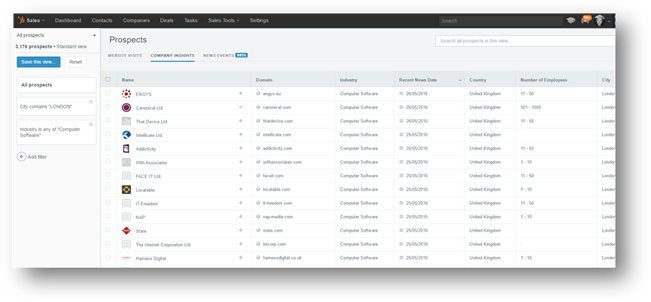
Again, with a simple click you can add them to your CRM (you can also ‘select all’ and mass import).
Lastly, there is the Calendar – this is a web based calendar that allows people to book slots in your diary without you needing to mess around with emails back and forth. This is one of my favourite features. It’s so simple to set up and for your candidates/clients to use – all they do is click on a link and then can select a time to speak to you – it also supports international time zones and you can choose when you’re available. It syncs with your main calendar so you’ll never have conflicts.
This is what it looks like to your contacts once they click on the link:

Hubspot Sales is $50 per user per month (although they do have regular offers), you can try it for free but you won’t have access to the sequences, prospects or calendar.
Hubspot Marketing
This is Hubspot’s main product – and it’s vast! Whilst they have made is as user friendly as possible, you do need to understand the fundamentals of inbound marketing to get the most from the system. Hubspot has an academy within their site where you can get certified as an inbound marketer. This takes you through the entire nature of inbound marketing and provides guidance on how to use Hubspot to its maximum. It’s quite a long course but if you have the time I’d recommend signing up.
Hubspot closely integrates with your website and allows you to, amongst other things, create landing pages, calls to actions (CTA) and content. You can use the marketing suite to manage all your social media and put prospects into personas – such as ‘HR Managers’, ‘Internal Recruiters’ and ‘Hiring Managers’. This is especially useful when sending out marketing information to certain groups of contacts.
There are literally hundreds of features within Hubspot Marketing – you can get a free 30-day trial but you’ll need to invest the time to get the system configured for how you want to use it.
If you plan on using Hubspot for all your marketing efforts then you’ll need to dig deep, especially if you have a large database (pricing starts at $100 a month for 100 contacts, $800 for 1,000 contacts and $2,400 for 10,000 – there is also an on boarding fee of between $600 – $5,000). What’s more, it does take lots of time and resources and you won’t see an immediate return on your investment. Remember, inbound marketing is predominately driven by content and for it to be successful you’ll need to commit to writing great content at least once a week.
So can it be used in your agency?
Depending on what challenges your business faces, be that finding new clients or attracting candidates (or both) then Hubspot might be worth considering. But remember, it’s not an ATS or RMS and does have its limitations.
That being said, should you have a person or a team dedicated to new business development or have your own Marketing department then Hubspot could be a good solution.
Don’t get me wrong, I am a huge fan of Hubspot – for our business it’s a fantastic tool and from speaking to other Hubspot customers the vast majority agree. But is it right for recruitment? In some businesses it could be a great a solution but for the vast majority I would encourage you to delve a lot deeper into the pro’s and con’s and look at some other ATS platforms (there’s over 600!!) before you add Hubspot to your technology stack.
There are some fantastic ATS / RMS platforms on the market that have taken some of the core elements from Hubspot and ‘recruitified’ them. For the vast majority of Recruitment Agencies, it’s better to have one system for all your clients and candidates. It’s a hard enough job getting recruiters to use one system, let alone multiple !
Whatever you decide, I would highly recommend that you sign up for their sales blogs – they share some amazing content about sales techniques and produce some terrific infographics.
Test it for yourself
You can try Hubspot CRM with your LinkedIn connections – it’s really easy and it’s free. Just export your contacts from within LinkedIn (My Network > Connections) then click on the gear icon (top right) and export your connections as a CSV file. Sign up free to Hubspot here – follow the instructions or click on Contacts. To the far right you’ll see a gear icon – click that and you’ll be able to import your CSV file.
LinkedIn is strict on the data it allows you to export so all you’ll be able to extract is the name, email, job title and company name but that should be enough for you to gauge Hubspot.
P.S If you like the idea of having on-line calendars, then there are plenty of alternatives.
What are the alternatives to Hubspot?
The ATS, CRM, RMS market is booming – there are over 600 platforms who offer solutions to the Recruitment Sector. If you’re looking to adopt new technology for your business, or want to learn more about inbound marketing and how you it can be applied to recruitment, we offer independent, impartial and professional advice across the entire Technology eco-system. We work with you to identify the best solutions to help grow your business, after all we’re pretty sure you don’t have time to evaluate 600+ platforms!
 About the author: Darren Franks was the former CEO of an International Recruitment Agency before establishing TalentintheCloud and spent 16 years in Agency Recruitment. Living and working in the UK, Middle East and Africa he has gained considerable experience across a multitude of sectors, regions and industries. With a passion for HRTech and the Recruitment Industry, Darren launched the business to provide independent and professional advisory services to both agencies and corporates on all matters relating to technology within talent acquisition.